Documents in. Validated data out. People only where it matters.
Invoices, purchase orders, freight bills, pay applications, permits and forms, read by AI, checked against your business rules, and handed to QuickBooks as a ready-to-import bill file or to anything else as CSV — with every exception shown to a person first. Up to 15 pages per file.
- No templates to build
- Line items, not just totals
- Set up by us, not by you
- Audit trail on every field
Freight or logistics? See the BOL, POD, rate-confirmation and carrier-invoice workflow →
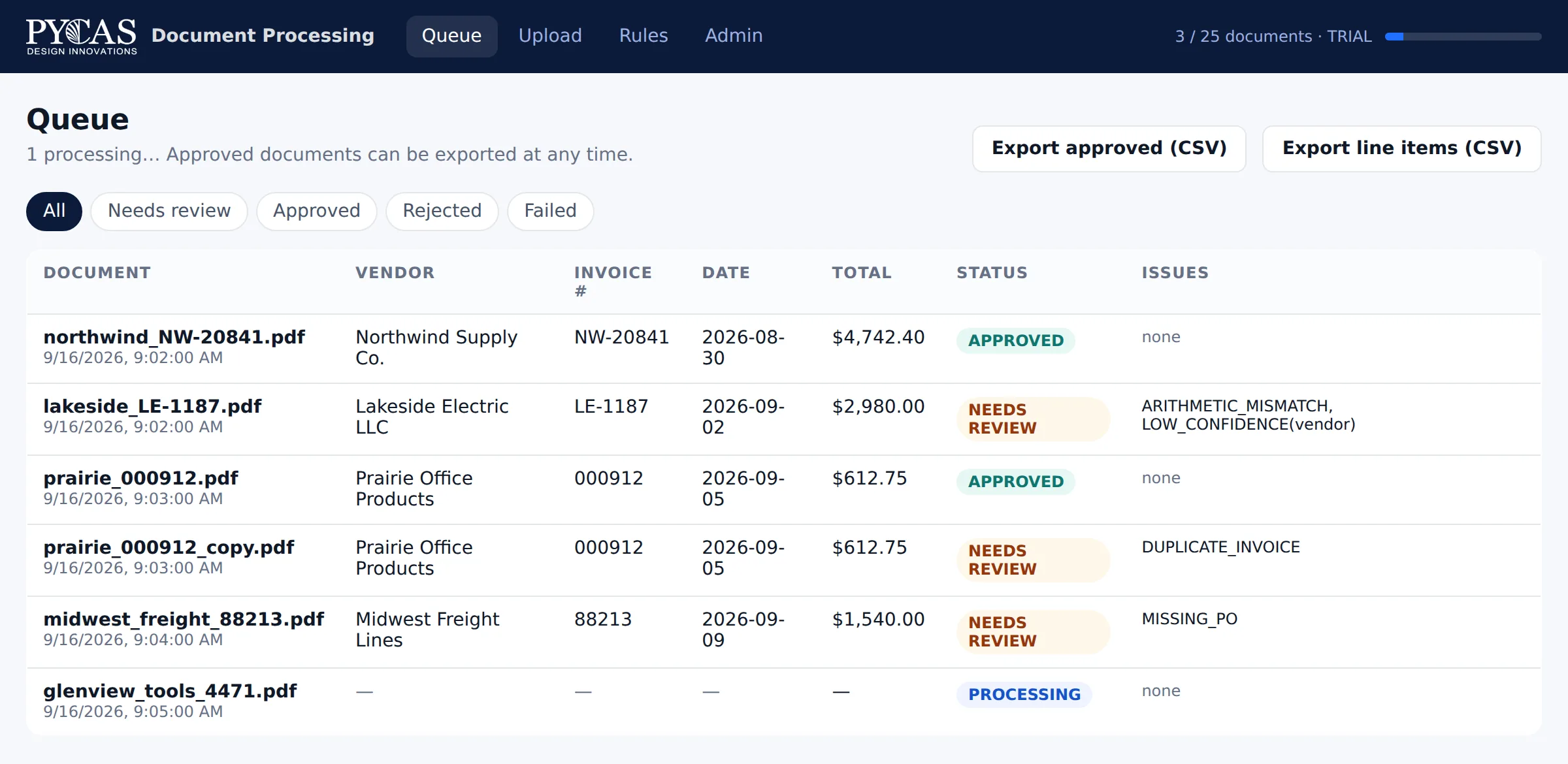
The real review queue after six sample invoices: three approved automatically, three stopped for review, each showing the rule it failed.
Your team is the integration layer
Somewhere in your business a person opens a PDF, reads a handful of fields and types them into another system. Then someone else checks it. Two-thirds of accounts-payable teams still work this way, and the number went up last year, not down.
It is slow, it costs around nine dollars an invoice in staff time, and it is where errors enter your books. It also doesn't scale: more volume means more people, more overtime or a longer backlog.
The cheap capture apps read the document. They don't check it, match it, or tell you why something is wrong. That gap is what we fill.
Re-keying
Information already on the document is typed again anyway.
Silent errors
A transposed digit in a total or a wrong PO is found weeks later, if ever.
Backlogs
Documents sit in inboxes and shared folders until someone has time.
No audit trail
Who entered what, from which document, and who checked it is anyone's guess.
Document → Extract → Validate → Review → Export
Five stages. AI does the reading; your business rules decide what is acceptable; people handle only the exceptions.
The exception routing is the point. Anything that fails a business rule is held for a person; everything that passes flows straight through with a full audit record.
Capture is cheap. Trusting the result is the expensive part.
Receipt capture built into accounting software, and stand-alone capture apps, are fine for clean, single-page receipts. They stop where the risk starts.
| Capability | Built-in capture in accounting software | Stand-alone capture apps receipt and invoice scanners | Pycas managed pipeline |
|---|---|---|---|
| Header fields (vendor, date, total) | Yes | Yes | Yes |
| Line items and tables | Typically no | Varies by plan | Included |
| Business-rule validation (math, dates, duplicates) | Manual review of everything | Varies; usually duplicate checks | Arithmetic, required fields, date plausibility, duplicates: deterministic and explainable |
| PO-required and approved-vendor checks | No | Typically no | Included; matching against your PO or rate records is configured in a pilot |
| Exception review screen with reasons | Approve everything one by one | Usually confidence flags | Only failures, each with the rule that failed |
| Documents beyond invoices and receipts | No | Varies | Freight bills, pay applications and forms today; other types configured in a pilot |
| Set up and rules written by a person who knows your business | You | You | Pycas, included |
| Someone to handle the exceptions for you | No | No | Optional add-on |
| Deployed into your own cloud account if required | No | No | Yes, as an engagement |
The first two columns describe the category in general terms, not any specific product; check each vendor for current details. If a capture app is all you need, we will tell you so on the assessment call.
The model is a component. The pipeline is the product.
Pycas Document Processing reads with three readers built into the platform: an expense reader tuned for invoices and receipts, a form reader for labelled fields and tables, and a language reader for documents with no fixed layout, handwriting and poor scans. They run in turn, and each is called only when the one before it came back thin, so a clean invoice is read once and a difficult scan gets every reader we have.
We deliberately do not use AI for validation. Checking that subtotal plus tax equals the total, that a date is plausible, or that a vendor is on your approved list is arithmetic and lookup. Doing it deterministically is faster, cheaper and more reliable, and it means the system can explain exactly why a document was held.
Reading a document is the easy part. What you are buying is the layer around it: knowing which extractions to doubt, catching the discrepancies, and putting the doubtful ones in front of a person before they reach your ledger.
AI handles
- ✓Reading fields from documents with variable layouts and many senders
- ✓Extracting line-item tables (description, quantity, price)
- ·Classifying incoming documents (invoice vs. statement vs. PO) · planned
- ✓Handwriting and low-quality scans
Deterministic rules handle
- ✓Arithmetic checks: line items, subtotal, tax, total
- ✓Required fields, date plausibility, duplicate invoices and duplicate files
- ✓Lookups against your vendor, PO, customer or rate records
- ✓Routing: auto-approve, or hold for human review
Try it on your own documents
Create an account and run up to 25 of your own invoices, POs or forms through the real pipeline in the next few minutes: extraction, your validation rules, and the review screen showing exactly what was pulled out, what was held back, and why. Nothing to install, no card, no call first.
Or have us do it with you — send the documents over and we will set the account up for your document type, run them, and walk you through the results.
Assessment documents are deleted automatically 30 days after upload unless you continue on a plan, and you can delete them yourself at any time from inside the app.
documents, free
Start Free — 25 DocumentsRather have us do it with you? Request an assessment, or book a 20-minute walkthrough and we'll process a document you send during the call.
Fixed-price pilot: one document type, your rules, three weeks.
You send 50–100 real examples and tell us what "correct" means. We build the workflow, run every document through it, and hand you a results report you can check line by line.
- ✓Extraction and your business rules configured for one document type (up to 20 fields plus line items)
- ✓Up to 500 documents processed during the pilot, with the review screen for your team
- ✓Export to a QuickBooks Online bill-import file, CSV/Excel, or your database through the API
- ✓Written results: accuracy by field, exception rate, what was caught, hours it would save
- ✓A production quote with the pilot fee credited when you proceed within 60 days
Fixed. 50% on signing, 50% on delivery. Credited toward production.
- Duration
- 3 weeks
- Multiple document types or ERP integration
- $4,900 – $6,900, quoted after discovery
- Production build afterwards
- Typically $7,500 – $25,000, fixed scope
- Then
- A managed plan or a care plan
Priced like a capture app. Runs like a department.
Every plan includes extraction, your validation rules, the exception review screen, exports, the REST API, and setup by Pycas. Unused documents never cost anything. Need more in a given month? A top-up pack adds 100 documents for $29, bought from inside the app when you need it — no metered overage, no surprise bill. Pay yearly and get one month free: eleven months' price for twelve, so Starter saves $39, Business $119 and Scale $349 a year.
Items marked planned are on the roadmap and not available yet; ask us for timing before you buy if one matters to you. Everything with a check mark works today.
Subscribe from inside the app: create your account first (a minute, no card), so the plan switches on for the right account, and the free 25-document assessment is yours on the way through. Card checkout is handled by Square; the charge appears as SQ *PYCAS IMAGING, our affiliate company. Cancel any time.
Starter
- ✓One document type, one workflow
- ✓Line items, validation rules, exception review
- ✓CSV and Excel export, including a QuickBooks bill import file
- ✓REST API with per-account keys
- ✓90-day document retention
- ·2 users · planned
- ✓Setup by Pycas · email support
Business
- ·Up to 3 document types · planned
- ✓Everything in Starter
- ·QuickBooks Online or Xero connector · planned
- ✓PO and vendor-list matching
- ·Watched email inbox intake · planned
- ✓Priority support
- ✓12-month document retention
- ·5 users · planned
Scale
- ·Unlimited document types and workflows · planned
- ✓Everything in Business
- ·Multiple accounting connectors · planned
- ·Unlimited users · custom retention · planned
- ✓Named engineer · response-time commitment
Add-on: exceptions handled by Pycas
We review and resolve every held document within one business day, contact the vendor when a bill doesn't add up, and send you a weekly summary. Your team only sees the final numbers.
Plans run in Pycas's AWS environment and switch on for your account as soon as the payment clears, usually within seconds — you do not have to wait for us. Need it deployed in your own cloud account, a document type with unusual rules, or an integration we don't list? That is the pilot path above.
Built around your documents and your rules
Ingestion
PDFs, scanned images and photos, up to 15 pages per file, through the upload screen or the REST API. Watched inbox and shared-folder pickup are planned.
OCR & document understanding
Text and layout extraction that handles rotated scans, missing text layers and inconsistent templates from different senders.
Field extraction
The fields you define: vendor, invoice number, dates, PO, line items, totals, applicant details, permit numbers, whatever the document type needs.
Business-rule validation
Do the line items sum to the total? Is the date plausible? Is the vendor known? Does it match the PO? Rules are yours; we encode them.
Human review for exceptions
A review screen shows the document beside the extracted data, highlights what failed and why, and lets a person approve or correct it.
Integration & audit trail
Validated data lands in QuickBooks Online as an import-ready bill file, or in your database or workflow via API, CSV or Excel, with complete processing and approval history. Direct accounting connectors are planned.
DocPipe Verify: check an invoice before it is posted or paid
Already reading invoices with your own tools? Send the extracted fields to DocPipe Verify and get a clear PASS, REVIEW or REJECT verdict from the same checks DocPipe runs before export: totals, required fields, duplicates, dates and currency. $0.01 per invoice, nothing stored.
How DocPipe Verify worksThe pipeline you see in the screenshots
Pycas maintains a working invoice pipeline used for assessments: PDF and scanned-image intake, field and line-item extraction, arithmetic and business-rule validation, exception routing, review screen, audit trail and CSV export. The screenshots on this page are that system on sample documents.
Production plans use commercial document-AI services behind the same pipeline. We are happy to run it on your documents.
The same pattern runs in ShootPro24AI
Confidence scoring, human-in-the-loop review routing, asynchronous processing in the cloud and audit history are the core of ShootPro24AI, the platform Pycas developed and operates in production. Document processing applies the same engineering to a different file type.
Read the ShootPro24AI case studyStraight answers
Is the pilot really fixed at $2,900?
Yes, for one document type with up to 20 fields plus line items, up to 500 documents, and export to a QuickBooks Online bill file, CSV or your database. If you need several document types, an ERP or other accounting-system integration, or deployment into your own cloud account, we quote $4,900–$6,900 after a discovery call and put the number in writing before any work starts.
What if the results aren't good enough?
You get the written results report either way, and you owe nothing beyond the pilot fee. Realistically, accuracy is rarely the problem on typed documents; the useful output of a pilot is knowing your exception rate and which rules catch what. If a capture app would serve you as well, we'll say so.
Why are your plans priced near the capture apps if you do more?
Because the software cost of reading a document is genuinely low now; that part shouldn't carry a premium. What costs money is setup, rules, integration and exception handling, which we price separately and up front (the pilot, the add-on, care plans) instead of hiding them in a per-document rate.
How does annual billing work?
Choose "Pay yearly" on the Plans screen in the app. You pay eleven months' price once (Starter $429, Business $1,309, Scale $3,839) and the plan runs for twelve months; the monthly document allowance and top-ups work exactly as on a monthly plan. Annual payments are not refunded for unused months, so most customers start monthly and switch to yearly once the workflow is settled.
Where does my data go?
Documents and extracted data are stored encrypted in Pycas's AWS environment in the United States, isolated per account. Documents, extracted data and processing history are kept for your plan's retention period, measured from upload (30 days on the assessment, 90 days on Starter, 12 months on Business and Scale), then deleted by a nightly job; you can export at any time, and delete any document, or all of them, yourself from inside the app. Every reader runs inside that same environment and region, with AI-service content use opted out at the account level, so your documents are never used to train any model. The processors involved are listed in our Privacy Policy. Running the pipeline in your own cloud account is available as a pilot or Scale engagement.
What support do I get?
Help is built into the app. The ? in the corner of every screen opens an assistant that answers questions about how the product works, any time; anything about your account, a payment or a specific document goes by the in-app email form to a person at Pycas, with your account details already attached, and we reply within one business day (Monday to Friday, Central time). Business and Scale plans get priority handling, and Scale includes a named engineer. Emailing info@pycasdesign.com or calling (847) 656-5756 works too.
Do you replace my bookkeeper or my accounting software?
No. We feed them. The pipeline hands clean, validated bills to QuickBooks Online as an import file, and your bookkeeper or accountant reviews the exceptions instead of typing every bill. Many of our best conversations start with the bookkeeper.
Can you handle scanned or photographed documents?
Yes. OCR runs before extraction, and low-confidence fields are flagged for review instead of guessed. Clean PDFs with a text layer give the best results; photographed receipts are the hardest and we will tell you what to expect after the assessment.
What is a "document"?
One file of up to three pages counts as one document; longer files count as one document per three pages, so a 12-page pay application is four. Files are limited to 15 pages. One file should be one bill: a PDF holding several separate invoices is read as a single document, so split those before uploading (automatic splitting is planned).
Start with one document type.
Tell us which document your team keys in by hand and roughly how many arrive each month. We'll come back with a pilot scope within two business days, or run the free assessment on 25 samples first.